Build 04: GitHub, JIRA, Docker, and Cloud Deploys as a Solo Builder
How I’m using GitHub, JIRA, Docker, Cloud Build, and Cloud Run to stay focused and build a process that scales—even as a solo founder.
Staying on Track with GitHub, JIRA, Docker, and Cloud Deploys GitHub JIRA Docker Cloud Build Cloud Run Cursor AI
GitHub and JIRA might seem like heavyweight tools made for big teams, but I’ve found them surprisingly helpful in my solo app-building journey. They help me stay focused, organize my ideas, and avoid unnecessary distractions.
Even though I’m building this project on my own, I want to treat it like something real—something that could grow into a full product or even a team. These tools give me the structure and reliability to do just that.
1. GitHub: Keep It Organized GitHub
Every line of code lives in GitHub—not just my laptop. I keep a main branch for production, and create a new branch for each task I’m working on. Each branch ties back to a JIRA ticket, so there’s always a clear record of what changed, when it changed, and why.
This setup keeps me organized and makes it easy to revisit or undo changes when needed. If something breaks—whether it’s me or Cursor AI going off-script—I can quickly roll back to a stable version.
Honestly, using GitHub makes me feel like a professional.
If you’re new to tech or building your first product, I highly recommend getting comfortable with GitHub early. The sooner you make it part of your workflow, the easier everything else becomes—from version control to collaboration and deployment.
2. Docker: Build Once, Run Anywhere Docker
In my previous roles, I had seen teams use Docker to keep development and production environments consistent—but I never had to configure it myself. I understood its value, but not the setup process.
Thankfully, with Cursor AI as my pair programmer, getting Docker up and running for my own app was surprisingly smooth.
Here’s what I did:
Downloaded Docker and set up an account
Asked Cursor to scaffold the Dockerfile and .dockerignore for my project
Used Cursor again to help configure the container so that I could build locally and push to GitHub for deployment
With Docker in place, my app now runs the same whether I’m testing it locally or deploying it to production. No more worrying about missing packages, misconfigured environments, or “why does this only break in prod?” moments.
It’s also a huge time-saver. Once the environment was set, I stopped having to debug weird issues between machines. Everything just works—cleanly and reliably.
3. Cloud Build + Cloud Run: Automated Deploys Cloud Build Cloud Run
My code gets deployed automatically using Cloud Build and Cloud Run.
I’ve set up two triggers:
- One for the
mainbranch that pushes to production - Another for development branches, identified using naming patterns
Once code is pushed, Cloud Build creates a Docker image and deploys it—only if everything passes. This helps me catch mistakes early and keeps the site stable.
No extra clicking or copying files. Just code, commit, push, and it’s live.
4. JIRA: Make a Plan and Stick to It JIRA
I had mixed feelings about using JIRA in the beginning.
On one hand, I love the idea of writing well-crafted PRDs and breaking them into actionable tickets. On the other, it felt like overkill for a side project I was still figuring out. I’d write tickets for myself—then abandon them within a week. Looking back, I think the problem was the kind of tickets I was writing. They were too far ahead, trying to map out the whole product rather than where I actually was.
What I really needed were spike tickets—tickets that gave me space to explore and clarify. Instead, I was prematurely planning ten steps ahead.
Everything changed once I realized that Cursor AI would be my primary coding companion. That gave me the boost I needed to shift into execution mode. At that point, clarity became essential, and JIRA helped me stay laser-focused and avoid scope creep.
So I went back to basics.
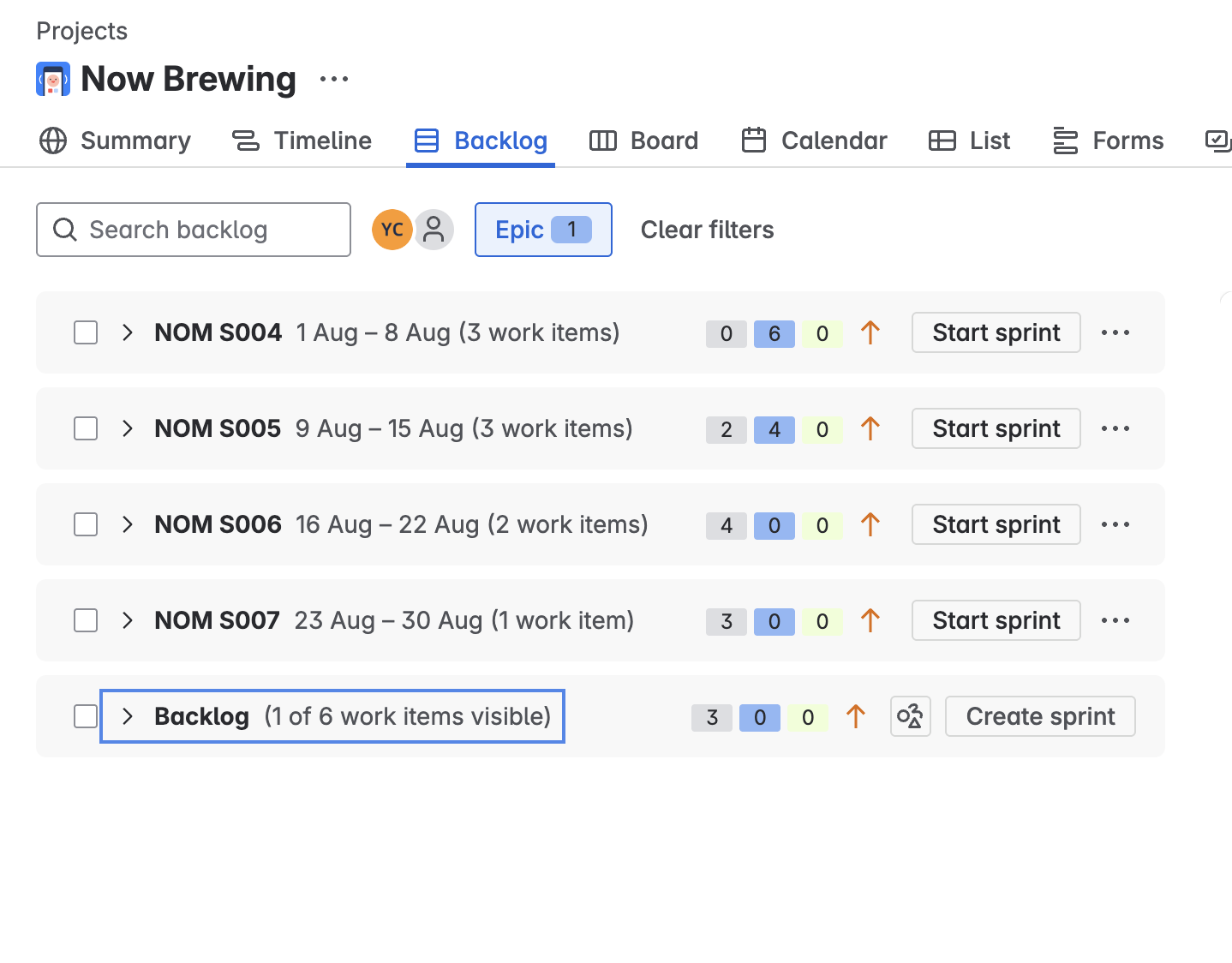
I started by jotting down the absolute must-have features for an MVP. I turned each one into a JIRA ticket and grouped them under a single “MVP” epic. Each ticket had a clear goal and a definition of done.
If I spot new ideas or bugs while working, I jot them down in JIRA and keep moving. For small things, I bundle them into a general “cleanup” or “UI polish” ticket. It’s a simple system, but it works.
This structure helps me focus on what matters now—without losing track of what’s next.
Summary: Building with Systems That Grow GitHub JIRA Docker Cloud Build Cloud Run
Right now, I’m building solo. But by using GitHub, Docker, Cloud Build, and JIRA from the start, I’ve created a strong foundation.
These tools aren’t just for big teams—they’re for anyone who wants to build with purpose. They give me clarity, protect my time, and make it easier to stay focused on what really matters.
Next up: more feature-building and finally putting this foundation to use.